Modern websites and browsers are powerful platforms that allow users to interact with online services, manage accounts, make payments, and access sensitive information. However, the same browser features that improve user experience can also create security risks when they are misused by attackers.
One such threat is the BeEF attack, which stands for Browser Exploitation Framework attack. BeEF is a security testing framework originally designed for penetration testers and security professionals to evaluate browser vulnerabilities. However, attackers can misuse similar techniques to compromise browsers, steal information, perform unauthorized actions, or manipulate users.
Unlike traditional malware attacks that directly infect a device, BeEF-based attacks often target the relationship between the user, browser, and website. If an attacker successfully “hooks” a browser session, they may gain control over certain browser activities depending on the available vulnerabilities and security weaknesses.
Understanding how BeEF attacks work and applying proper security practices can significantly reduce the risk. Website owners, developers, and everyday internet users should know the common attack methods and the steps required to protect against them.
What Is a BeEF Attack?
BeEF (Browser Exploitation Framework) is an open-source penetration testing tool used to analyze browser security. Security researchers use it to understand how browsers respond to different types of attacks and to identify weaknesses in web applications.
A BeEF attack usually involves injecting malicious JavaScript code into a webpage. When a user visits the compromised page, the browser may execute the script and create a connection between the attacker and the victim’s browser.
This connection is commonly called a browser hook.
Once a browser is hooked, an attacker may attempt actions such as:
- Collecting browser information
- Detecting browser vulnerabilities
- Performing social engineering attacks
- Manipulating webpage content
- Testing session security
- Redirecting users to malicious pages
The actual impact depends on several factors, including browser security settings, website protection measures, user permissions, and whether additional vulnerabilities exist.

How Do BeEF Attacks Work?
A typical BeEF attack follows several stages:
1. Browser Hook Injection
The attacker places malicious JavaScript code into a website, advertisement, compromised plugin, or vulnerable web application.
This code attempts to connect the visitor’s browser with the attacker-controlled system.
2. User Visits the Compromised Page
When someone opens the infected webpage, the browser loads the malicious script.
In many cases, the user does not immediately notice anything unusual because the attack happens silently in the background.
3. Browser Connection Is Established
If successful, the browser communicates with the attacker’s control panel.
The attacker can then see available information about the browser environment and possible weaknesses.
4. Exploitation Attempts Begin
The attacker may try different techniques depending on the available access level.
Examples include:
- Exploiting outdated browser versions
- Taking advantage of weak website security
- Using social engineering techniques
- Attempting to steal sensitive information
Why Are BeEF Attacks Dangerous?
BeEF attacks are dangerous because browsers contain valuable information and are connected to many online services.
A compromised browser may expose:
- Login sessions
- Website activity
- Personal information
- Stored browser data
- User behavior patterns
For businesses, browser exploitation can create additional risks because employees often access:
- Company dashboards
- Customer databases
- Internal applications
- Cloud services
A successful browser attack can become an entry point for larger security incidents.
How Website Owners Can Protect Against BeEF Attacks
Website security plays an important role in preventing browser exploitation. Website owners should focus on reducing opportunities for malicious scripts to execute.
1. Use a Strong Content Security Policy (CSP)
A Content Security Policy is one of the strongest defenses against unauthorized JavaScript execution.
CSP allows website owners to control which scripts, resources, and connections browsers are allowed to load.
A properly configured CSP can help prevent:
- Cross-site scripting (XSS)
- Unauthorized script execution
- Malicious third-party code loading
For example, websites should avoid allowing unlimited script sources and should restrict scripts only to trusted locations.
2. Prevent Cross-Site Scripting (XSS)
Many browser-based attacks rely on JavaScript injection vulnerabilities.
Cross-site scripting occurs when attackers insert malicious scripts into a website that other users later load.
To reduce XSS risks:
- Validate user input
- Sanitize uploaded content
- Escape dynamic website output
- Avoid unsafe JavaScript practices
- Use secure development frameworks
Every user-generated input field should be treated as potentially dangerous.
3. Keep Website Software Updated
Outdated website components are common targets for attackers.
Website owners should regularly update:
- Content management systems
- Plugins
- Themes
- Libraries
- Server software
Old plugins and vulnerable extensions can allow attackers to inject malicious scripts into websites.
4. Use HTTPS Everywhere
HTTPS protects communication between users and websites by encrypting transmitted data.
A valid SSL/TLS certificate helps prevent attackers from modifying traffic between the browser and server.
Websites should:
- Use HTTPS by default
- Redirect HTTP traffic to HTTPS
- Keep certificates updated
HTTPS alone does not prevent all attacks, but it is an essential security layer.
5. Remove Untrusted Third-Party Scripts
Many websites use external scripts for:
- Analytics
- Advertising
- Chat systems
- Marketing tools
- Social media widgets
However, every third-party script increases the attack surface.
Website owners should:
- Review external scripts regularly
- Remove unnecessary scripts
- Use trusted providers only
- Monitor changes in third-party code
A compromised external script can potentially affect thousands of websites.
6. Implement Secure Authentication
Although BeEF primarily targets browsers, weak authentication can increase the damage after a successful attack.
Websites should implement:
- Multi-factor authentication (MFA)
- Secure session management
- Strong password policies
- Automatic session expiration
Sensitive accounts should always have additional protection.
How Users Can Protect Their Browser Against BeEF Attacks
Website owners are not the only people responsible for security. Individual users can also reduce browser attack risks.
1. Keep Your Browser Updated
Browser developers regularly release security patches.
Users should update:
- Chrome
- Firefox
- Edge
- Safari
- Other browsers
Running an outdated browser increases exposure to known vulnerabilities.
2. Avoid Suspicious Websites and Links
Many browser attacks begin with social engineering.
Users should avoid:
- Unknown email links
- Suspicious downloads
- Fake login pages
- Untrusted websites
Before clicking a link, check whether the website address is legitimate.
3. Use Browser Security Extensions Carefully
Some browser extensions improve security by blocking unwanted scripts.
Useful categories include:
- Script blockers
- Privacy protection tools
- Anti-tracking extensions
However, users should install extensions only from trusted sources because malicious extensions can create security problems themselves.
4. Disable Unnecessary Browser Permissions
Modern browsers allow websites to request access to:
- Camera
- Microphone
- Location
- Notifications
Users should review permissions regularly.
Remove access from websites that no longer need permission.
5. Avoid Using Unknown Public Computers
Public computers may contain:
- Malicious extensions
- Keyloggers
- Unsafe software
Avoid accessing sensitive accounts from unknown devices.
If necessary, always log out after use.
6. Use Security Software
Reliable security software can help detect suspicious activity.
Users should maintain:
- Updated antivirus protection
- Operating system security updates
- Firewall protection
Security tools provide additional protection against many browser-based threats.
How Developers Can Build BeEF-Resistant Web Applications
Developers play a major role in preventing browser exploitation.
Important development practices include:
Secure Coding Practices
Developers should:
- Validate all input
- Avoid unsafe functions
- Follow secure coding standards
- Review dependencies regularly
Security should be considered during development, not after deployment.
Protect Cookies and Sessions
Cookies containing authentication information should use secure settings.
Important cookie attributes include:
- Secure flag
- HttpOnly flag
- SameSite protection
These settings reduce the possibility of session theft.
Perform Security Testing
Regular security testing helps identify weaknesses before attackers find them.
Useful methods include:
- Vulnerability scanning
- Code reviews
- Penetration testing
- Security audits
Common Signs of a Possible Browser Attack
Users and administrators should watch for unusual behavior.
Possible warning signs include:
- Unexpected website redirects
- Unknown browser extensions
- Strange pop-ups
- Unauthorized account activity
- Slow browser performance
- Unknown scripts loading on websites
These signs do not always mean a BeEF attack is happening, but they should be investigated.
BeEF Attacks vs Traditional Malware
BeEF attacks differ from traditional malware.
| Feature | BeEF Attack | Traditional Malware |
|---|---|---|
| Main Target | Browser environment | Device/system |
| Common Method | JavaScript exploitation | File or software infection |
| Requires User Interaction | Often yes | Sometimes |
| Detection Difficulty | Can be harder | Often detected by security tools |
| Main Risk | Browser control and information exposure | System compromise |
Understanding this difference helps organizations choose appropriate security measures.
What To Do If You Suspect a BeEF Attack
If you believe your browser or website may be compromised, take immediate action.
For Website Owners:
- Remove suspicious scripts
- Check website files for unauthorized changes
- Review server logs
- Update software
- Scan for vulnerabilities
- Reset affected credentials
For Browser Users:
- Close suspicious browser tabs
- Remove unknown extensions
- Clear browser data
- Update the browser
- Run a security scan
- Change important passwords if necessary
Quick response can limit potential damage.
Conclusion
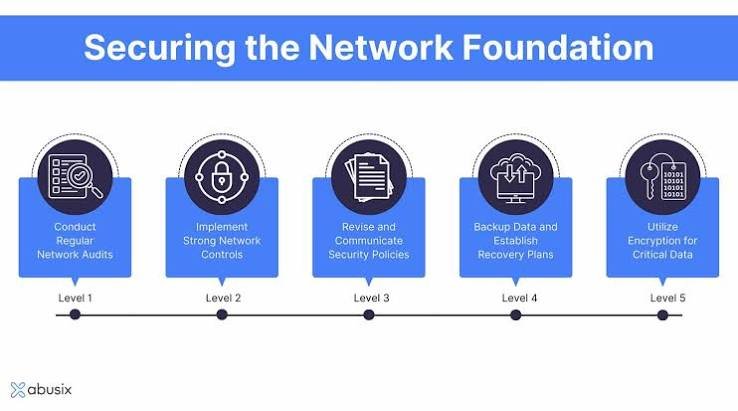
BeEF attacks demonstrate how browser security has become an important part of modern cybersecurity. While the Browser Exploitation Framework is mainly a legitimate penetration testing tool, attackers can use similar browser exploitation techniques to target vulnerable websites and users.
Protecting against these attacks requires multiple security layers. Website owners should focus on secure coding, strong content security policies, regular updates, and vulnerability testing. Users should maintain updated browsers, avoid suspicious links, control permissions, and practice safe browsing habits.
No single security measure can eliminate every risk, but combining strong website protection with responsible browser usage can greatly reduce the chances of browser-based attacks and help create a safer online environment.