

Modern web browsers play an essential role in everyday digital activities, including online banking, shopping, communication, and business operations. As browsers handle sensitive information and run complex web applications, they have become important targets for cyberattacks. Understanding browser security and BeEF exploitation is therefore essential for users, developers, and cybersecurity professionals.
The Browser Exploitation Framework (BeEF) is an open-source security testing tool designed to demonstrate browser-based vulnerabilities. It helps security professionals understand how malicious scripts and weaknesses in browser environments can affect users.
However, modern browsers have evolved significantly, introducing advanced security features such as sandboxing, site isolation, the same-origin policy, Content Security Policy (CSP), HTTPS encryption, and automatic security updates.
These technologies work together to reduce the risks associated with browser exploitation. Understanding how modern browsers defend against BeEF can help users recognize potential threats and adopt safer browsing practices.
What Is BeEF and Browser Exploitation?
The Browser Exploitation Framework, commonly known as BeEF, is an open-source penetration testing framework used to study browser security. It allows cybersecurity professionals to examine browser vulnerabilities and evaluate the effectiveness of security controls in authorized testing environments.
Unlike traditional malware that directly targets operating systems, browser exploitation focuses on weaknesses in browsers, websites, extensions, and client-side technologies.
Common browser security weaknesses include:
- Vulnerable website scripts
- Outdated browser versions
- Unsafe browser extensions
- Misconfigured security policies
- Insecure web applications
- Poorly managed user permissions
A browser-based attack may begin when a user visits a compromised website or interacts with malicious content. Depending on the vulnerability, an attacker may attempt to manipulate browser behavior or access information that should remain protected.
Modern browsers use multiple security layers to limit these activities and prevent browser vulnerabilities from becoming more serious security incidents.
Why Are Modern Browsers Common Targets?
Web browsers provide access to a wide range of online services, making them valuable targets for attackers. A single browser session may contain access to personal accounts, financial services, business applications, and private documents.
Several factors contribute to browser security risks.
Complex Browser Architecture
Modern browsers support advanced technologies, including JavaScript, WebAssembly, multimedia features, and interactive web applications. Their complexity creates a large attack surface, increasing the importance of regular security testing and updates.
Third-Party Website Content
Many websites load external scripts, advertisements, analytics tools, and other resources. If these resources are compromised or improperly managed, they may introduce additional security risks.
Browser Permissions
Browsers can access sensitive features such as cameras, microphones, location services, and clipboard information when users grant permission. Poor permission management can expose users to unnecessary risks.
Browser Extensions
Extensions improve browser functionality, but some request extensive permissions. An untrustworthy or compromised extension may access browsing information or modify website content.
Increasing Dependence on Web Applications
Businesses and individuals increasingly depend on browser-based applications for important activities. Consequently, protecting browser sessions and sensitive information has become an important part of cybersecurity.
How Browser Sandboxing Protects Against BeEF
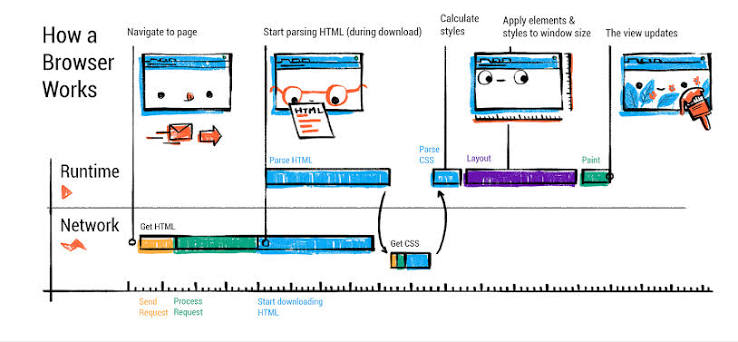
Browser sandboxing is one of the fundamental security mechanisms used by modern browsers. It creates restricted environments in which websites and browser processes operate with limited access to the underlying operating system.
Without appropriate restrictions, a compromised browser component could potentially interact with sensitive system resources. Sandboxing helps prevent this by limiting the permissions available to individual processes.
How Browser Sandboxing Works
Modern browsers often separate website content from processes that have broader system privileges. These restrictions help prevent potentially malicious content from accessing operating system resources directly.
Sandboxing can help restrict access to:
- Operating system files
- System processes
- Installed applications
- Sensitive hardware resources
If an attacker exploits a browser vulnerability, sandbox restrictions can reduce the potential impact of that compromise.
How Sandboxing Limits BeEF-Related Risks
BeEF can demonstrate certain risks associated with compromised browser sessions. However, interacting with a browser through scripts does not automatically provide access to the underlying operating system.
Sandboxing introduces an additional security boundary between browser content and the device. Although it cannot prevent every browser vulnerability, it can make it more difficult for an attacker to turn a browser compromise into a wider system compromise.
Site Isolation and Cross-Site Protection
Site isolation is another important security feature in modern browsers. It separates websites into different processes or security contexts to reduce the risk of sensitive information being exposed across websites.
For example, a user may have a banking website and a social media platform open simultaneously. Site isolation helps prevent a compromised page from accessing protected information belonging to the other website.
How Site Isolation Improves Browser Security
Site isolation provides several security benefits:
- Separates content from different websites.
- Reduces opportunities for cross-site data exposure.
- Limits the impact of certain browser vulnerabilities.
- Strengthens protection for sensitive browsing sessions.
This feature is particularly useful when users access multiple websites containing private information during the same browsing session.
However, site isolation is not a complete defense against every browser attack. Its effectiveness depends on the browser’s implementation and the particular vulnerability involved.
Same-Origin Policy: Preventing Unauthorized Data Access
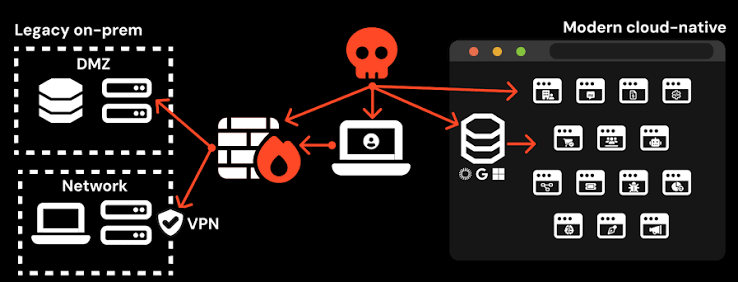
The same-origin policy (SOP) is one of the most important browser security mechanisms. It restricts how scripts running on one website can access information belonging to another website.
A website’s origin is determined by three components:
- Protocol, such as HTTP or HTTPS
- Domain name
- Port number
When two websites have different origins, the same-origin policy generally prevents scripts on one website from freely accessing sensitive information from the other.
How the Same-Origin Policy Defends Against Browser Exploitation
Imagine that a user is logged in to an online banking service while browsing an unrelated website. The same-origin policy helps prevent scripts on the unrelated website from directly reading protected banking information.
This restriction is particularly important for protecting authenticated sessions and private website data.
Although the same-origin policy provides significant protection, it does not eliminate every cross-site risk. Incorrectly configured cross-origin resource sharing (CORS), cross-site scripting (XSS), and other application vulnerabilities can still create security problems.
JavaScript Security Restrictions in Modern Browsers
JavaScript powers many interactive website features, but unrestricted script execution could introduce serious security risks.
Modern browsers therefore restrict what ordinary website scripts can access. These restrictions help prevent malicious websites from interacting directly with sensitive operating system resources.
What JavaScript Cannot Normally Access
Under standard browser security restrictions, ordinary website JavaScript generally cannot:
- Read arbitrary files from a user’s computer.
- Execute operating system commands directly.
- Freely control installed applications.
- Access protected browser information.
- Bypass browser permission requirements.
These restrictions make many traditional browser exploitation techniques more difficult.
Why JavaScript Security Still Matters
Although browsers restrict JavaScript capabilities, vulnerable websites can still expose users to attacks. Cross-site scripting, insecure dependencies, and unsafe handling of user input can allow attackers to execute unwanted scripts within a website’s security context.
Developers should follow secure coding practices and avoid treating browser restrictions as a replacement for application-level security.
Content Security Policy (CSP) Against Malicious Scripts
Content Security Policy, commonly known as CSP, is a browser security mechanism that allows website owners to specify which resources a browser is permitted to load.
A properly configured CSP can reduce the impact of certain script injection attacks and other client-side vulnerabilities.
How Content Security Policy Works
Website developers configure CSP through HTTP response headers or, in certain cases, HTML metadata. The policy defines which sources are permitted to provide scripts, stylesheets, images, and other resources.
CSP can help restrict:
- Unauthorized JavaScript execution
- Untrusted script sources
- Unexpected external resources
- Certain forms of script injection
For example, a website can establish a policy that permits scripts only from approved sources. A carefully designed policy can make it more difficult for injected scripts to execute successfully.
CSP Limitations Against BeEF
CSP can help reduce some risks associated with malicious scripts, but it is not a complete defense against BeEF or browser exploitation.
Its effectiveness depends on the policy’s configuration. Overly permissive rules, unsafe exceptions, or incorrectly implemented policies can reduce its protective value.
Website owners should regularly review their CSP configuration and test it against their application’s actual requirements.
HTTPS Encryption and Secure Browser Communication
HTTPS protects communication between a browser and a website by encrypting data transmitted over the connection. It uses Transport Layer Security (TLS) to provide confidentiality and help verify the identity of the website.
How HTTPS Protects Browser Sessions
HTTPS helps protect users against several network-based threats, including:
- Unauthorized interception of transmitted information
- Modification of data during transmission
- Certain forms of connection manipulation
- Exposure of sensitive information over unsecured networks
Modern browsers also warn users when they encounter certain certificate problems or potentially unsafe connections.
Does HTTPS Prevent BeEF Attacks?
HTTPS is an important part of browser security, but it does not prevent every form of browser exploitation.
It protects communication in transit rather than guaranteeing that a website’s scripts, extensions, or applications are safe. A malicious website can also use HTTPS.
For this reason, HTTPS should be combined with other browser security mechanisms, including sandboxing, permission controls, and secure application development.
Automatic Browser Updates and Security Patches
Outdated browsers can expose users to publicly known vulnerabilities. Attackers may attempt to exploit weaknesses that have already been addressed in newer browser versions.
Modern browsers commonly provide automatic updates to deliver security improvements without requiring users to install every update manually.
What Browser Security Updates Fix
Security updates may address:
- Browser engine vulnerabilities
- Memory safety issues
- Sandbox weaknesses
- Security bypass vulnerabilities
- Other newly discovered security problems
Keeping a browser updated helps reduce exposure to known vulnerabilities that could otherwise be exploited.
Why Automatic Updates Matter
Automatic updates reduce the time users spend running vulnerable browser versions. They also make it easier for organizations and individuals to receive important security improvements.
Users should keep automatic updates enabled and restart their browsers when required to complete the installation of security fixes.
Browser Permission Controls and User Protection
Modern browsers require websites to request permission before accessing many sensitive device features. These controls help users decide which websites can interact with specific resources.
Common Browser Permissions
Depending on the browser and device, websites may request access to:
- Camera
- Microphone
- Location
- Notifications
- Clipboard
Permission controls prevent websites from accessing many of these features without the user’s approval.
How Permission Controls Reduce Browser Risks
Permission prompts provide users with an opportunity to evaluate whether a website genuinely needs access to a sensitive feature.
However, permission controls cannot prevent every form of social engineering. Attackers may attempt to persuade users to approve unnecessary requests.
Users should review permission prompts carefully and revoke access when a website no longer requires it.
Browser Extension Security and Exploitation Prevention
Browser extensions provide additional functionality, including password management, productivity tools, accessibility features, and content filtering. However, extensions can also introduce security vulnerabilities.
Some extensions request permissions that allow them to read website content, modify webpages, or access browsing activity.
How Modern Browsers Protect Extensions
Modern browsers use several mechanisms to improve extension security, including:
- Permission management
- Restricted extension APIs
- Extension review systems
- Security policies
- Controls over extension installation
These mechanisms help limit the risks associated with potentially harmful extensions.
How Users Can Reduce Extension Risks
Users should install extensions from trusted sources and carefully review the permissions they request. Removing unused extensions can also reduce the number of potential security risks in a browser.
Even extensions obtained from official stores should be reviewed periodically because their permissions, ownership, or behavior may change.
How Modern Browsers Detect Malicious Websites
Many modern browsers include built-in protection systems designed to identify potentially dangerous websites and downloads.
These systems may use website reputation information, threat databases, and other detection mechanisms to identify known threats.
Common Threats Detected by Browser Protection
Browser security systems may warn users about:
- Phishing websites
- Known malware distribution pages
- Suspicious downloads
- Reported malicious websites
- Certain deceptive online activities
When a browser identifies a known threat, it may display a warning before the user continues.
These protections can help reduce the likelihood of accidentally visiting dangerous websites. However, new or previously unknown threats may not always be detected.
Important HTTP Security Headers for Browser Protection
HTTP security headers allow website developers to communicate important security policies to browsers. When configured correctly, these headers can strengthen protection against several types of web attacks.
Content-Security-Policy
CSP defines which sources a website allows for scripts and other resources. It can reduce the impact of certain cross-site scripting attacks.
Strict-Transport-Security
HTTP Strict Transport Security (HSTS) instructs browsers to use HTTPS for future connections to a website, subject to the policy’s settings.
X-Content-Type-Options
This header helps prevent browsers from interpreting files as a different content type than the server specifies. The nosniff value is commonly used for this purpose.
Referrer-Policy
Referrer-Policy controls how much referring URL information a browser shares when navigating between websites or requesting resources.
Permissions-Policy
Permissions-Policy allows website owners to restrict access to certain browser features, such as cameras, microphones, and location services.
Together, these headers provide developers with additional ways to strengthen browser security and reduce exposure to common web vulnerabilities.
Common Browser Exploitation Methods and Their Defenses
Different browser exploitation techniques require different security controls. No single browser feature can prevent every type of attack.
Cross-Site Scripting (XSS)
Cross-site scripting occurs when an application allows untrusted content to execute as code in a user’s browser.
Common defenses: Secure coding practices, appropriate output encoding, input validation, and a carefully configured Content Security Policy.
Malicious JavaScript
Malicious JavaScript attempts to misuse browser capabilities or exploit weaknesses in websites and browser components.
Common defenses: Browser sandboxing, JavaScript security restrictions, CSP, and timely security updates.
Session-Related Attacks
Session attacks may target authentication cookies or attempt to exploit weaknesses in how applications manage authenticated users.
Common defenses: HTTPS, Secure and HttpOnly cookie attributes, appropriate SameSite settings, and strong authentication practices.
Clickjacking
Clickjacking involves deceiving users into interacting with website elements they did not intend to select.
Common defenses: Content Security Policy’s frame-ancestors directive and appropriate frame-protection policies.
Drive-By Downloads
Drive-by downloads involve attempts to deliver unwanted or malicious files through website interactions or software vulnerabilities.
Common defenses: Browser download protections, updated software, safe browsing features, and careful handling of downloaded files.
Browser Vulnerability Exploitation
Attackers may attempt to exploit flaws in browser engines, rendering components, or other browser features.
Common defenses: Sandboxing, site isolation, automatic updates, and security patches.
Limitations of Modern Browser Security
Modern browsers provide multiple layers of protection, but no browser can guarantee complete security against every possible attack.
Several risks remain even when a browser is fully updated.
Social Engineering Attacks
Attackers may trick users into revealing credentials, approving suspicious permissions, or downloading harmful files. Technical browser protections cannot prevent every form of deception.
Unsafe Browser Extensions
An extension with excessive permissions or malicious behavior may expose sensitive information despite the browser’s built-in security controls.
Newly Discovered Vulnerabilities
Previously unknown security flaws may affect browsers before developers have an opportunity to release patches.
Weak Account Security
Browser protections do not automatically prevent account compromises caused by weak passwords, reused credentials, or stolen authentication information.
These limitations demonstrate why browser security must combine technical safeguards with responsible user behavior and secure application development.
Best Practices for Improving Browser Security
Users can take several practical steps to reduce their exposure to browser-based threats.
Keep Your Browser Updated
Install browser updates regularly and enable automatic updates whenever possible. Security patches help address known vulnerabilities.
Use Strong Authentication
Use unique, strong passwords and enable multifactor authentication on important accounts. These measures provide additional protection if login credentials are exposed.
Review Website Permissions
Allow access to sensitive features only when necessary. Regularly review saved permissions and remove access that is no longer required.
Remove Unnecessary Extensions
Keep only the extensions you need. Review their permissions and remove extensions that are unfamiliar, outdated, or no longer useful.
Avoid Suspicious Links and Downloads
Be cautious with unexpected links, attachments, and downloads. Avoid entering sensitive information on websites whose authenticity you cannot verify.
Use HTTPS Websites
Check that websites use secure HTTPS connections, particularly when entering passwords or transmitting sensitive information. Remember that HTTPS alone does not prove a website is trustworthy.
Pay Attention to Browser Warnings
Do not ignore security warnings without understanding the risks. If a browser identifies a potentially dangerous website or download, investigate before proceeding.
How Security Professionals Use BeEF Responsibly
BeEF is primarily intended for browser security research, penetration testing, and educational demonstrations. Security professionals can use it to understand browser-related risks and evaluate the effectiveness of security controls.
Authorized testing may help professionals:
- Identify weaknesses in web applications.
- Evaluate browser security configurations.
- Improve cybersecurity awareness.
- Assess the effectiveness of defensive controls.
- Develop recommendations for reducing browser-related risks.
All testing should take place in an authorized, controlled environment. Testing browsers or websites without permission may violate applicable laws, organizational policies, or privacy requirements.
Responsible security research focuses on identifying vulnerabilities, documenting findings, and helping organizations improve their defenses.
The Future of Browser Security
Browser security continues to evolve as web applications become more sophisticated and online threats change. Browser developers are continually improving security architecture and introducing additional protections.
Future developments may include stronger process isolation, improved privacy controls, more secure extension systems, advanced threat detection, and enhanced identity protection.
Developments in memory-safe programming and more restrictive browser architectures may also help reduce certain classes of vulnerabilities.
As more personal and business activities move to web applications, browser security will remain an important part of the wider cybersecurity landscape.
Conclusion
Modern browsers defend against BeEF and browser exploitation through multiple layers of security. Sandboxing, site isolation, the same-origin policy, JavaScript restrictions, Content Security Policy, HTTPS encryption, permission controls, and automatic updates all help reduce the risks associated with browser-based attacks.
Although these security mechanisms make many exploitation techniques more difficult, they cannot eliminate every vulnerability or prevent every form of social engineering. Their effectiveness depends on proper implementation, regular maintenance, and responsible browsing practices.
Users can improve their browser security by installing updates, reviewing permissions, removing unnecessary extensions, avoiding suspicious downloads, and using strong authentication. Developers can further strengthen protection through secure coding practices and correctly configured HTTP security headers.