Modern web browsers are powerful applications that allow users to interact with websites, access online services, and run complex web applications. However, because browsers handle sensitive activities such as authentication, communication, and data processing, they have become an important area of security research.
One security concept often discussed in browser security is the BeEF browser hook. BeEF, short for Browser Exploitation Framework, is a security testing framework designed to demonstrate how a compromised browser session can be controlled after a user’s browser becomes connected to a testing environment.
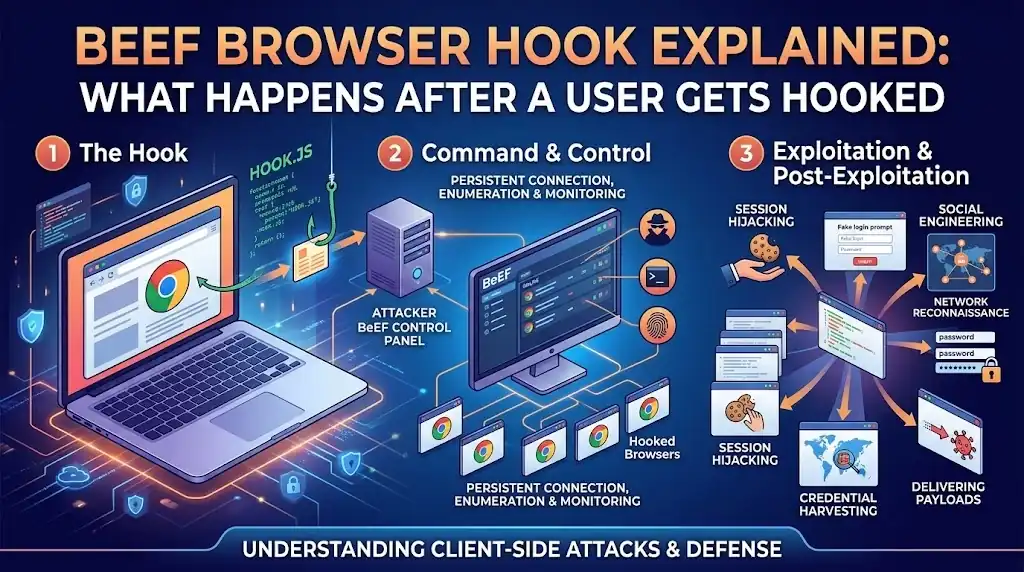
The phrase “browser hook” may sound complicated, but the basic idea is simple: a small piece of JavaScript code connects a browser to a BeEF server, allowing security professionals to study browser behavior, test defenses, and understand potential risks.
This article explains what happens after a user gets hooked, how the browser hook works at a high level, why browser security testing matters, and how organizations can protect users from browser-based threats.
What Is a BeEF Browser Hook?
A BeEF browser hook is a JavaScript-based connection between a browser and a BeEF server. In security testing scenarios, a browser becomes “hooked” when it loads a specific script that creates communication between the browser and the testing framework.
The purpose of this connection is not to attack random users but to help security researchers and penetration testers understand browser vulnerabilities, user awareness risks, and security weaknesses in web environments.
After a browser is hooked, the BeEF framework can collect information about the browser environment and display available security testing options. The level of access depends on browser permissions, security settings, and the limitations of modern web protections.
A browser hook does not automatically mean a computer is fully compromised. Unlike traditional malware that installs itself on a device, a browser hook usually operates within the browser session and is limited by browser security controls.
How Does a Browser Become Hooked?
A browser becomes hooked when a user’s browser loads the BeEF hook script.
In legitimate security testing, this may happen during:
- Internal penetration tests
- Security awareness exercises
- Controlled laboratory demonstrations
- Web application security assessments
In a real-world attack scenario, criminals may attempt to deliver malicious scripts through methods such as:
- Compromised websites
- Cross-site scripting vulnerabilities
- Social engineering techniques
- Unsafe browser interactions
The important point is that the browser does not become connected because BeEF “breaks” the browser automatically. The connection usually requires the browser to execute JavaScript from a page or application.
Modern browsers include many protections that make unauthorized browser control more difficult, including:
- Same-origin policies
- Permission systems
- Content Security Policy (CSP)
- Sandbox protections
- Secure browsing warnings
What Happens Immediately After a Browser Gets Hooked?
After a successful hook, the browser establishes communication with the BeEF server. The framework begins identifying information about the browser session.
At a high level, several things may happen:
1. Browser Identification
The framework may detect basic browser-related information, such as:
- Browser type
- Browser version
- Operating system details
- Screen information
- Available browser features
This information helps security testers understand the environment they are analyzing.
For example, an outdated browser version may represent a higher security risk than a fully updated browser.
2. Session Communication Begins
Once the connection exists, the hooked browser communicates with the BeEF server.
This communication allows the security tester to observe the browser session and perform approved security checks.
The connection is usually maintained through normal web communication methods rather than through traditional malware-style installation.

3. Security Testing Information Becomes Available
BeEF organizes browser testing capabilities into modules. These modules help testers evaluate different security scenarios.
Examples of testing categories include:
- Browser information gathering
- Security awareness testing
- Client-side security analysis
- Browser configuration checks
The purpose of these modules is to identify weaknesses and improve defenses.
Does a BeEF Hook Give Full Control of a Computer?
A common misunderstanding is that a hooked browser gives an attacker complete access to the user’s entire device.
That is not generally true.
A browser hook primarily affects the browser environment. Modern operating systems and browsers are designed with multiple security boundaries that prevent websites from freely accessing system resources.
A browser hook usually does not automatically provide access to:
- Personal files stored on the computer
- Installed applications
- Hardware devices without permission
- Operating system controls
However, browser-based access can still create security concerns because browsers often contain valuable information, including:
- Active sessions
- Website interactions
- User activity data
- Stored browser information
The actual impact depends on the browser version, security settings, user permissions, and the surrounding environment.
Why Are Browser Hooks Important in Cybersecurity?
Browser hooks are important because many modern attacks begin at the browser level.
People spend significant time inside browsers for:
- Online banking
- Cloud applications
- Business systems
- Social platforms
Because browsers are central to daily activities, understanding browser security helps organizations reduce risks.
Security professionals use tools like BeEF to answer questions such as:
- How vulnerable are users to browser-based attacks?
- Are security controls working properly?
- Do employees recognize suspicious activity?
- Are web applications securely configured?
Common Security Risks Related to Browser Hooks
Although BeEF is a legitimate security testing framework, the concepts behind browser hooking relate to several real-world security risks.
Cross-Site Scripting (XSS)
Cross-site scripting occurs when attackers inject malicious scripts into websites or web applications.
If successful, these scripts may run in other users’ browsers.
Common causes include:
- Poor input validation
- Unsafe handling of user-generated content
- Missing output encoding
Strong web development practices help reduce XSS risks.
Social Engineering
Attackers often rely on users clicking links or visiting unsafe pages.
Even strong technical defenses can be weakened when users are tricked into interacting with malicious content.
Security awareness training remains an important defense.
Outdated Software
Older browsers may contain known vulnerabilities.
Keeping browsers updated reduces exposure to many security issues.
Signs That a Browser Session May Be Unsafe
Users usually cannot easily identify a browser hook directly. However, some warning signs may indicate suspicious browser activity.
Possible indicators include:
- Unexpected browser behavior
- Unknown extensions
- Frequent redirects
- Strange pop-ups
- Unusual login activity
- Browser settings changing without permission
These signs do not always mean a browser is hooked, but they should be investigated.
How Organizations Protect Against Browser-Based Threats
Organizations can reduce browser security risks through multiple layers of protection.
Keep Browsers Updated
Regular updates fix known vulnerabilities and improve security protections.
Organizations should maintain:
- Automatic updates
- Supported browser versions
- Security patch management
Use Content Security Policies
Content Security Policy helps control which scripts and resources a website can load.
A properly configured CSP can reduce the impact of certain script-based attacks.
Implement Secure Web Development Practices
Developers should follow secure coding principles, including:
- Validating user input
- Encoding output correctly
- Protecting authentication systems
- Avoiding insecure scripts
Train Users
Employees should understand:
- How phishing works
- Why suspicious links are dangerous
- How to report security issues
Human awareness is an important part of cybersecurity.
Monitor Browser and Network Activity
Security teams can use monitoring tools to identify unusual behavior, suspicious connections, and potential security incidents.
BeEF Browser Hook vs Traditional Malware
Many people compare browser hooks with malware, but they are different concepts.
| Feature | Browser Hook | Traditional Malware |
|---|---|---|
| Main Target | Browser session | Entire system |
| Installation | Usually script-based | Usually installed program |
| Persistence | Often limited to session | Can remain after restart |
| Access Level | Browser environment | Potentially system-level |
| Purpose | Security testing or browser analysis | Often malicious activity |
Understanding this difference helps avoid confusion about what a browser hook can and cannot do.
How Security Researchers Use BeEF Responsibly
Ethical security testing requires permission and clear boundaries.
Security researchers typically use BeEF in controlled environments to:
- Demonstrate browser risks
- Test web applications
- Improve security awareness
- Identify weaknesses before attackers do
Using browser exploitation tools against systems without authorization can be illegal and unethical.
Responsible security testing follows rules such as:
- Obtaining written permission
- Testing only approved targets
- Protecting collected information
- Reporting vulnerabilities properly
How Users Can Reduce Browser Security Risks
Individual users can improve browser security by following simple practices:
Update Regularly
Install browser and operating system updates promptly.
Be Careful With Links
Avoid opening unknown links from suspicious messages or websites.
Review Extensions
Remove unnecessary browser extensions and only install trusted ones.
Use Strong Authentication
Enable multi-factor authentication whenever possible.
Protect Personal Information
Avoid entering sensitive information on unknown or unsecured websites.
Frequently Asked Questions
What does a BeEF browser hook do?
A BeEF browser hook creates a connection between a browser session and the BeEF framework for security testing and analysis.
Is BeEF malware?
No. BeEF is a legitimate security testing framework. However, like many security tools, it can be misused if operated without authorization.
Can a browser hook access my entire computer?
Generally, a browser hook is limited to the browser environment. It does not automatically provide complete access to the operating system.
Why do security professionals study browser hooks?
Security professionals study browser hooks to understand browser-based risks, test defenses, and improve web security.
How can I protect myself from browser-based attacks?
Keep software updated, avoid suspicious links, use secure browsing practices, and maintain strong authentication methods.
Conclusion
A BeEF browser hook represents an important concept in modern web security: the connection between a user’s browser session and a security testing framework. Understanding what happens after a browser gets hooked helps security professionals, developers, and everyday users better understand browser risks.
After a hook occurs, the browser communicates with the testing environment, allowing authorized security teams to analyze browser behavior and identify weaknesses. However, a browser hook does not automatically mean complete control of a computer. Modern browser protections, operating system security features, and responsible development practices limit what can happen.
The real value of studying browser hooks is not learning how to compromise users but understanding how browser-based threats work and how to prevent them. Strong security practices, regular updates, secure coding, and user awareness remain essential defenses against modern web threats.
By understanding concepts like BeEF browser hooks, organizations can build safer applications, improve security testing processes, and create a stronger defense against evolving browser-based attacks.